Cleanup duplicate media files in multi-language Jekyll _site
When I generate this bilingual Jekyll website www.ebroerse.nl, which is based on the al-folio theme, all the images get copied into folders for every language.
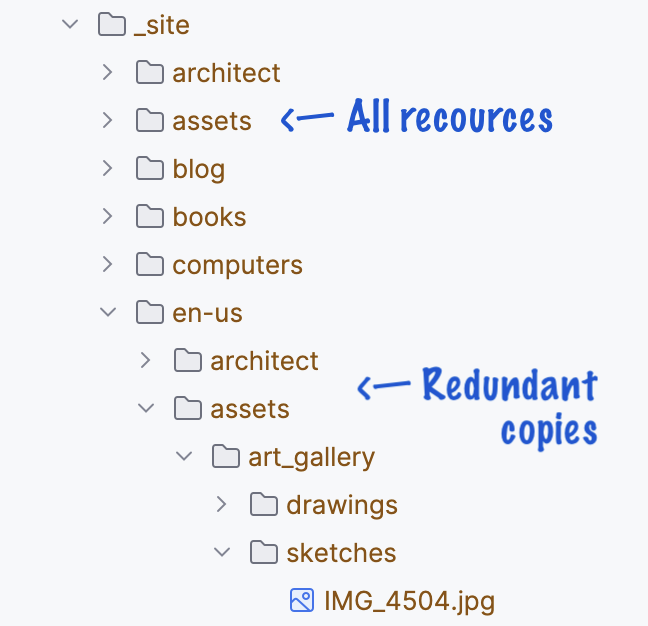
In part, those duplicates are needed to generate certain elements, but it’s a waste of resources to upload everything to your hosting server.
You can prevent uploading the redundant copies by placing the images with a relative_url filter, and run the script you find below after you have generated your site. On Mac the script ends by launching an FTP program to continue to upload everything to your hosting.
Responsive IMG tag with relative_url path
To place the image example.jpeg from the folder /assets/img/ in a markdown page, paste the path into the following tag (note the single and double straight quotes, and the / at the beginning of the path):
<img src='{{ "/assets/img/example.jpeg" | relative_url }}' alt="example" />
For every language on your site, the image will be retrieved from the single shared img folder of the default language.
If you have a CSS-style img-fluid for adapting the image to the screen size, you will use:
<figure>
  <img src='\{\{ "/assets/img/example.jpeg" | relative_url \}\}' alt="example" class="img-fluid" />
  <figcaption>Example</figcaption>
</figure>
The bash shell script
Copy this script to the root of your Jekyll repo, and run it manually after jekyll build finishes.
#!/bin/bash
# SPDX-FileCopyrightText: 2024-2026 EJ Broerse
#
# SPDX-License-Identifier: MIT

# Remove these non-default language (duplicate and unused) asset files - code by E Broerse, Licensed under under MIT
# Also run this script in the GitHub - Deploy workflow if you host on GitHub Pages.
rm -rf './_site/en-us/assets/downloads' './_site/en-us/assets/pdf' './_site/en-us/assets/python'
rm -rf './_site/en-us/assets/img'

# Launch the Transmit app
open -a "Transmit"  # change to your FTP app of choice
Bonus markup hint
To display the above example with the double curly brackets, place the code inside a raw/endraw block (but you can’t nest raw blocks, so I had to add the spaces inside the words, you get the idea):
{% r a w %}
<img src='{{ "/assets/img/example.jpeg" | relative_url }}' alt="example" />
{% e n d r a w %}
Enjoy Reading This Article?
Here are some articles you might like to read next: